
Mindful Breathing — paced breathing with sound cues, eyes closed
Finished early? Tap Done to close your break right away
Plans from $2.99/mo — or own it forever for $49.99
The missing wellness layer between you and your Mac
Viraam™ Digital Wellness & Eye Care App for Mac
Gentle Pauses for Your Well-being™
विराम · vi·raam · Sanskrit, n. · pause; rest; intermission
Eye rest, movement, hydration, and mindfulness - without the constant interruptions.
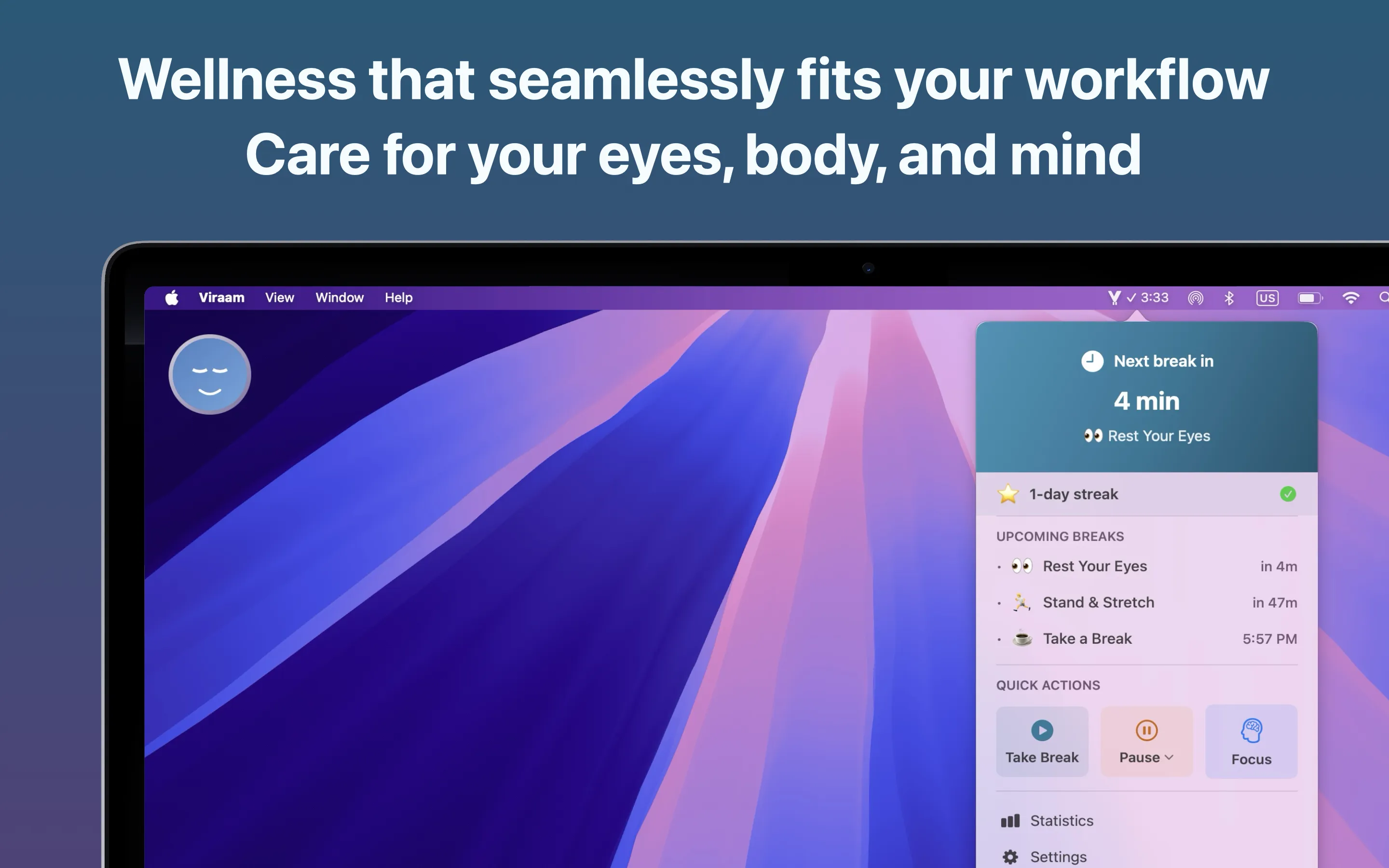
Your best work happens when you pause. Gentle reminders for eye rest, movement, and mindfulness — designed to fit your flow, not interrupt it.

Give your eyes, body, and mind the breaks they deserve.
Try free for 14 days • From $2.99/mo • No commitment
What people are saying
Five-star reviews from the Mac App Store
“Best break reminder app there is!”
“I tried about a dozen other apps before researching Viraam and I’m glad I kept searching too, because this app reminds me, not only to stand, but it’s so much more!”
“They answered most of my questions typically in the same day! After only about a week of use I opted to purchase their Lifetime License.”
“Love how it gently nudges me to stretch and rest my eyes without being annoying or breaking my focus.”
“It makes a lot of difference when you take those meaningful breaks to help your eyes to relax and mind to be self aware.”
“It reminds me to drink water, stretch, blink my eyes, and take short walks, all without being annoying.”
“Like the non-intrusive nudges; easy to follow. Am sure this will make a difference to overall well being in the long run.”
What is Viraam?
Viraam is a context-aware wellness break reminder app for Mac that helps you take the right break at the right time. It reminds you to rest your eyes on the 20-20-20 rule, stretch, drink water, walk, and take a mindful pause.
Viraam respects your focus — reminders wait out meetings, calls, and full-screen video by default, or keep running if you'd rather. And its audio-guided eye exercises let you rest your eyes without looking at the screen.
Built for developers, designers, writers, students, creators, and anyone who spends long hours at a screen.
- Platform
- macOS 14.0 or later
- Category
- Digital wellness & eye care
- Includes
- 6 reminder types, 2 cursor nudges
- Free trial
- 14 days, no card required
- Price
- $2.99/mo · $19.99/yr · $49.99 once
- Data collected
- None — stays on your Mac
- Works offline
- Yes — no account, no servers
- Available from
- Mac App Store
- Language
- English
- Version
- 1.6.1 — August 2026
Screen time adds up. Viraam helps you pause.
The Reality
Deep into your work, your eyes are tired and your neck is stiff. But you push through anyway.
The Cost
Skipping breaks feels productive. Until the fatigue, the headaches, and the fog catch up.
The Answer
Viraam notices meetings, full-screen video, and time away from your Mac, and nudges you at the right moment — so breaks feel earned, not forced.
Gentle reminders, not interruptions.
How Viraam supports your day
Smart Break Grouping
Fewer interruptions, same wellness benefits. When breaks overlap, Viraam groups them into one — so you stay in flow longer.
Rest and Refresh Your Eyes
Close your eyes, follow the sound. Audio-guided eye exercises that help tired eyes recover — in under two minutes.
Breathe With Your Eyes Closed
Thirty seconds noticing your breath, then paced five-in, five-out with sound cues. One, three or five minutes — full screen, or a card in the corner while you keep working.
Present Confidently
Your wellness stays private. Breaks are automatically hidden from screen sharing and recordings. No tracking, no accounts — all data stays on your Mac.
Respects Your Focus
Detects meetings and full-screen video, then pauses breaks until it closes — or for 30 or 60 minutes, or Keep breaks on if you'd rather they continue. It asks once, then remembers.
Zoom · Teams · Meet · FaceTime · YouTube · and more
Complete Wellness Coverage
Eyes, body, hydration, mindfulness, movement, and sleep — every kind of break your body needs, in one app.
Sounds That Calm, Not Startle
Each break arrives with its own calming sound — so you know what kind of pause it is without looking at your screen.
Subtle, Gentle, or Immersive
Subtle animation, Gentle toast, or Immersive full screen — pick the level of presence that fits the moment, and switch anytime.
Blend Into Any Room
Quiet Mode turns every reminder into a soft visual cue with one tap — nothing takes over your screen. Sound is a separate switch: flip Reminder Sounds off too when you need silence as well.
Make Every Break Your Own
Show your own message on Gentle and Immersive breaks — a mantra, a nudge, a reminder — or let Viraam keep rotating gentle wellness tips.
Done When You're Done
Finished early? Tap Done on a Gentle or Immersive break to log it and close instantly — for Stand & Stretch, Hydration, Take a Break, Walk, and Meditate.
Invisible Until You Need It
Launches instantly, optimized battery usage, and feels like a natural part of macOS. You'll forget it's running — until it gently reminds you to pause.
Focused Work Sessions
Structure your deep work with timed focus sessions and calming breathing breaks. Rest is part of the plan, not an afterthought.
Only While You're Working
Set separate weekday and weekend hours, and Viraam stays quiet outside them — no stretch reminder at 11pm, no hydration nudge before you've started.
Your Rhythm, Your Rules
Customize everything — which breaks matter, how often each one fires, how noticeable it is, your accent colour, and the sounds it uses. Your wellness, your way.
See Your Habits Build
Watch your streaks grow and celebrate perfect days. A simple calendar view that makes healthy habits feel rewarding.
Automate Your Wellness
8 Shortcuts actions to build your own routines. Focus Filters adapt your wellness settings to each Focus mode. Smart pause or subtle — your way.
14-day free trial • From $2.99/mo • macOS 14+
Breaks for Your Eyes, Body, and Mind
6 break reminders + 2 wellness nudges for complete coverage
Cursor Nudges
Cursor Following • Subtle • Animated • Non-blocking
Break Reminders
And one more, set differently
Wind Down Before Bed
The breaks above repeat on an interval. Sleep Prep is anchored to your bedtime instead. Set the time you want to be asleep and how far ahead you want the nudge — an 11pm bedtime with a two-hour lead means Viraam reminds you at 9pm to start winding down, so you get screen-free time before sleep. Your evenings feel calmer, not carried over from work.
Get started in under 30 seconds
Three simple steps to better wellness and focus
Install
Download from the Mac App Store and launch it. One click to get started.
Select Your Frequency
Choose your break rhythm: Minimal, Balanced, or Frequent.
Your 14-day trial starts automatically — no credit card needed.
You're all set
Viraam is now by your side - your wellness companion working quietly in the background.
Simple pricing.
Try free for 14 days — no credit card needed. Then choose your plan.
Independent review
“I evaluated a handful of the popular Mac App Store options for this. I landed on Viraam.”
Monthly
Flexible, cancel anytime
$2.99
per month
Yearly
Save 44% vs monthly
$19.99
per year · $1.67/mo
Lifetime
Pay once, own forever
$49.99
one-time · every update included
All plans include everything:
All 6 break types + 2 nudges
Audio-guided eye exercises
Smart Break Grouping
Unlimited Pomodoro sessions
Full customization
365-day trends & insights
Shortcuts, Siri & Focus Filters
Meeting & video detection
14-day free trial • No credit card needed
Frequently Asked Questions
Everything you need to know about Viraam
What is Viraam?
Viraam is a context-aware wellness break reminder app for Mac that helps you take the right break at the right time. It reminds you to rest your eyes on the 20-20-20 rule, stretch, drink water, walk, and take a mindful pause.
Viraam respects your focus — reminders wait out meetings, calls, and full-screen video by default, or keep running if you'd rather. And its audio-guided eye exercises let you rest your eyes without looking at the screen.
How easy is it to set up Viraam?
Download, open, choose a template — Minimal, Balanced, or Frequent — and Viraam is by your side. Your wellness companion, ready in under 30 seconds. Fine-tune timings, styles, and break types anytime.
How much does Viraam cost?
Viraam offers three plans: $2.99/month, $19.99/year (save 44%), or $49.99 lifetime (pay once, own forever). Try it free for 14 days, no credit card needed.
All plans include every feature — no tiers, no feature gating. Choose what works for your budget.
How do I subscribe to Viraam?
Two ways: tap Subscribe from within the app and choose your plan — that's the easiest. Or download from the Mac App Store and subscribe after your 14-day trial. All payments are processed securely by Apple.
Will Viraam interrupt me during meetings or videos?
By default, no — Viraam pauses breaks when it detects a video call or full-screen video. The first time it happens it asks how you'd like that handled: pause until it closes (the default), pause for 30 minutes, pause for 60 minutes on a call or 2 hours for video, or tap Keep breaks on to carry on as normal. Tick Remember my choice and it's automatic from then on. Cursor nudges are independent and keep their own settings.
What are Viraam's notification styles?
Viraam has three. Subtle shows a quiet animation near the menu bar with nothing to dismiss. Gentle shows a small toast with a wellness message or exercise suggestion. Immersive takes over the screen for a full pause with calming backdrops and your choice of sound. You can switch between them at any time, and Focus Filters can apply a different style per macOS Focus mode.
Can I use Viraam silently in a café or shared office?
Yes, using two controls. Quiet Mode switches every break reminder to a soft visual cue with one tap — no full-screen takeover — so nothing takes over your screen in a café, office or shared space. Sound is handled separately: break chimes keep playing until you switch off Reminder Sounds. For a fully silent setup, use both. They're deliberately independent, so you can also keep the chimes while only the visuals change.
Does Viraam access my calendar?
Only if you enable calendar integration for Focus Pomodoro. Viraam requests read-only access to your calendar events to display what task you're working on during focus sessions. This data is processed locally on your Mac and never sent to our servers.
Is my data private?
Yes. Your data stays on your Mac. Viraam doesn't send any analytics, telemetry, or usage data to external servers. We don't track you, period.
Screen Sharing Privacy: Break reminders are automatically excluded from screenshots, screen recordings, and screen sharing. When you're presenting on Zoom or sharing your screen, attendees won't see your break notifications - your wellness stays private.
Can I customize the break timings?
Yes. Every break type can be toggled on or off with its own interval, from minutes to hours. You can also choose the notification style — Subtle, Gentle, or Immersive — set your accent colour, pick break sounds or silence them, and use Working Hours so reminders only fire while you're actually working.
How does Smart Break Grouping work?
Viraam intelligently combines overlapping breaks into a single pause. Instead of multiple interruptions, you get one grouped break covering everything you need. Fewer pings, same wellness coverage.
Does Viraam track my progress?
Yes. Visual habit-tracking calendar shows your break patterns, streaks, and perfect day celebrations. 12-month trends and insights included.
What macOS version do I need?
Viraam requires macOS 14.0 (Sonoma) or later. The app is a lightweight native Swift application (~12MB) and works on both Apple Silicon and Intel Macs.
Does Viraam work with multiple monitors?
Yes. Viraam detects your multi-monitor setup and displays break reminders on your primary display. Cursor-following nudges track your cursor across all connected displays seamlessly.
What are audio-guided eye exercises?
Two gentle exercises for tired eyes — each begins with a brief set of instructions, then soft sound cues guide you through the rest. Together they take just 2.5 minutes, a moment of calm in your day.
What can I automate with Shortcuts?
Viraam includes 8 Shortcuts actions — start or skip a break, toggle pause, switch plans, and more. Build your own automations or trigger wellness routines from other apps and widgets.
What are Focus Filters?
Different Focus modes, different wellness settings. Choose between pause, subtle, gentle, or immersive notification styles — and optionally enable blink and posture nudges. Viraam adapts automatically when you switch Focus modes.
What is the refund policy?
All purchases are processed through the Mac App Store, and refunds are handled by Apple. If you're not satisfied, you can request a refund at reportaproblem.apple.com.
Still have questions?
hello@viraam.app